> ## Documentation Index
> Fetch the complete documentation index at: https://docs.routeway.ai/llms.txt
> Use this file to discover all available pages before exploring further.
# Service Tiers
> Choose between default, flex, and priority processing to balance cost and latency.
Some models support **service tiers** — processing modes that let you pay less or get faster responses depending on your needs. Flex is a great default when you want to cut costs without sacrificing output quality.
Service tiers are a **provider feature** from OpenAI and Gemini — not something Routeway implements on its own. When you set a tier, Routeway forwards it to the upstream provider and applies the matching price multiplier on your bill. Routeway does **not** run a separate queue or priority system; any latency or capacity differences come from how the provider handles that tier.
Service tiers are currently available on **select OpenAI and Gemini models only** — not every model from those providers, and not models from other providers. Check the [Models Catalog](https://routeway.ai/models) or the `capabilities.service_tiers` field in the [GET /v1/models](/getting-started/models) response to confirm a specific model supports them.
***
## Available Tiers
| Tier | Cost | Latency | Best for |
| :----------- | :--------------------------- | :--------------------------------------------------------------------------- | :------------------------------------------------------------- |
| **Default** | Standard model pricing | Balanced time-to-first-token (TTFT) and throughput | General production workloads |
| **Flex** | **50% off** standard pricing | Same generation speed once streaming starts; TTFT may occasionally be higher | Cost-sensitive workloads, high-volume usage, evals, batch jobs |
| **Priority** | **2×** standard pricing | Lower, more consistent TTFT on the provider side — even during peak demand | User-facing chat, real-time assistants, latency-sensitive apps |
Flex does not reduce output quality or token generation speed. The main difference is that time-to-first-token can be a bit higher on some requests. If the upstream provider's flex capacity is temporarily limited, the request may return `429` from the provider — you are not charged in that case.
***
## Supported Models
Service tiers are currently supported on a **subset of OpenAI and Gemini models**. Availability varies by model — Routeway does not enable tiers on every model from those providers, and models from Anthropic, DeepSeek, and other providers do not support them yet.
### Models Catalog
Open any model page on the [Models Catalog](https://routeway.ai/models) and scroll to the bottom. If the model supports service tiers, you'll see a **Service Tiers** section and tier-specific rates under **Token Pricing**.
For example, [GPT 5.6 Luna](https://routeway.ai/models/gpt-5.6-luna) shows all three tiers with their multipliers:
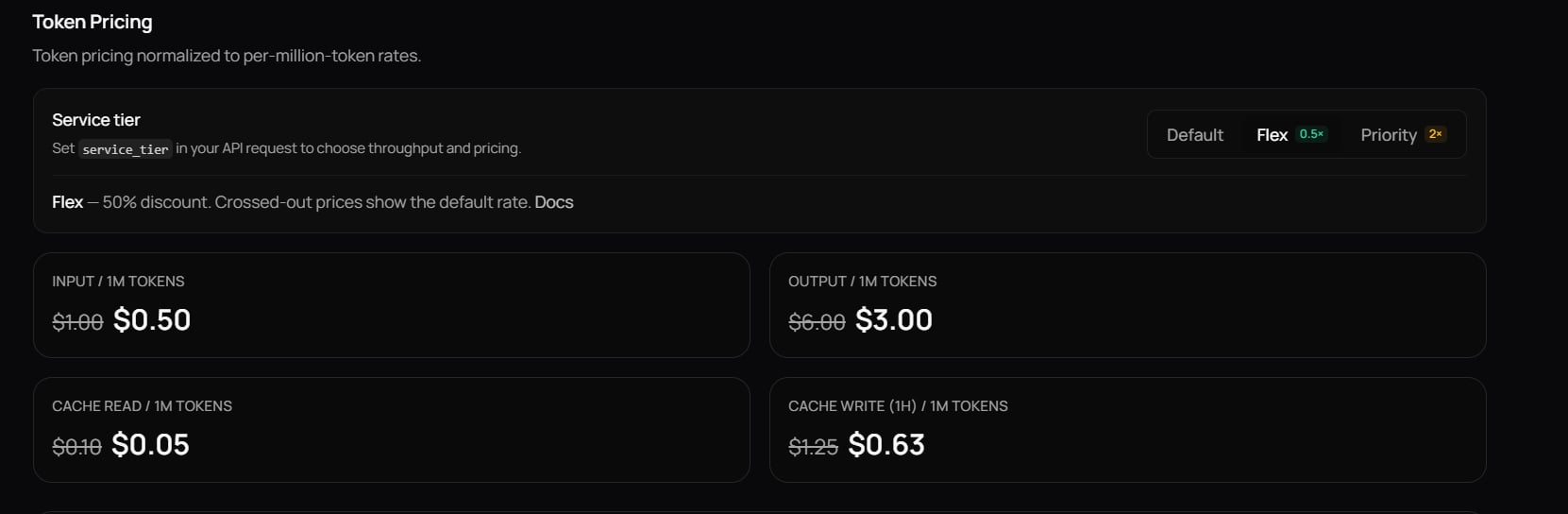 If a model does not support tiers, those sections are omitted from its page.
### API
Query the models endpoint and look for `service_tier` in `supported_parameters` and the tier list in `capabilities.service_tiers`:
```bash theme={null}
curl https://api.routeway.ai/v1/models \
-H "Authorization: Bearer $ROUTEWAY_API_KEY"
```
```json theme={null}
{
"id": "gpt-5.6-luna",
"owned_by": "openai",
"supported_parameters": ["temperature", "tools", "service_tier", "..."],
"capabilities": {
"service_tiers": ["default", "flex", "priority"]
},
"service_tiers": {
"flex": {
"price_multiplier": 0.5,
"note": "50% discount"
},
"priority": {
"price_multiplier": 2.0,
"note": "2x price"
}
}
}
```
Filter client-side to list all eligible models:
```python theme={null}
data = client.models.list()
tiered_models = [
m for m in data.data
if m.capabilities and getattr(m.capabilities, "service_tiers", None)
]
for m in tiered_models:
print(m.id, "—", m.owned_by, "—", m.capabilities.service_tiers)
```
Service tiers apply to the listed per-token rates in the model's `pricing` object. See [How Billing Works](/getting-started/billing) for how multipliers affect your bill.
***
## Setting a Service Tier
There are two ways to select a tier. Both produce the same result — use whichever fits your setup.
### Option 1: `service_tier` Parameter
Pass `service_tier` in the request body. This is the recommended approach when you control the API payload.
```python theme={null}
import os
from openai import OpenAI
client = OpenAI(
base_url="https://api.routeway.ai/v1",
api_key=os.getenv("ROUTEWAY_API_KEY")
)
# Flex — 50% cheaper
response = client.chat.completions.create(
model="gpt-5.6-luna",
messages=[{"role": "user", "content": "Summarize this dataset..."}],
service_tier="flex",
)
# Priority — 2× cost, lower TTFT
response = client.chat.completions.create(
model="gpt-5.6-luna",
messages=[{"role": "user", "content": "Help me debug this error."}],
service_tier="priority",
)
```
```javascript theme={null}
import OpenAI from "openai";
const client = new OpenAI({
baseURL: "https://api.routeway.ai/v1",
apiKey: process.env.ROUTEWAY_API_KEY,
});
// Flex — 50% cheaper
const flexResponse = await client.chat.completions.create({
model: "gpt-5.6-luna",
messages: [{ role: "user", content: "Summarize this dataset..." }],
service_tier: "flex",
});
// Priority — 2× cost, lower TTFT
const priorityResponse = await client.chat.completions.create({
model: "gpt-5.6-luna",
messages: [{ role: "user", content: "Help me debug this error." }],
service_tier: "priority",
});
```
```bash theme={null}
# Flex
curl https://api.routeway.ai/v1/chat/completions \
-H "Authorization: Bearer $ROUTEWAY_API_KEY" \
-H "Content-Type: application/json" \
-d '{
"model": "gpt-5.6-luna",
"messages": [{"role": "user", "content": "Summarize this dataset..."}],
"service_tier": "flex"
}'
# Priority
curl https://api.routeway.ai/v1/chat/completions \
-H "Authorization: Bearer $ROUTEWAY_API_KEY" \
-H "Content-Type: application/json" \
-d '{
"model": "gpt-5.6-luna",
"messages": [{"role": "user", "content": "Help me debug this error."}],
"service_tier": "priority"
}'
```
Accepted values: `"default"`, `"flex"`, and `"priority"`. Omit the parameter (or set `"default"`) to use standard pricing and performance.
### Option 2: Model Suffix
Append `:flex` or `:priority` to the model ID. This is useful in chat UIs and other tools where you cannot pass extra request parameters.
```python theme={null}
# Flex via model suffix
response = client.chat.completions.create(
model="gpt-5.6-luna:flex",
messages=[{"role": "user", "content": "Run this evaluation batch."}],
)
# Priority via model suffix
response = client.chat.completions.create(
model="gpt-5.6-luna:priority",
messages=[{"role": "user", "content": "What is the weather in Tokyo right now?"}],
)
```
Both approaches achieve the same result. Use `service_tier` when you have programmatic control over the request body, and the `:flex` / `:priority` suffix when you can only change the model name — for example in Open WebUI, SillyTavern, or other chat frontends.
***
## Response Field
The response includes a `service_tier` field indicating which tier actually processed the request:
```json theme={null}
{
"id": "chatcmpl-abc123",
"model": "gpt-5.6-luna",
"service_tier": "flex",
"choices": [
{
"message": {
"role": "assistant",
"content": "Here is the summary..."
},
"finish_reason": "stop"
}
],
"usage": {
"prompt_tokens": 120,
"completion_tokens": 85,
"total_tokens": 205
}
}
```
***
## When to Use Each Tier
Your everyday choice. Standard pricing with balanced performance for most production traffic.
Save 50% with the same output quality. Ideal when you want lower costs and can tolerate the occasional slower start — TTFT may be higher, but generation speed is unchanged.
Pay a premium for lower, more predictable TTFT when users are waiting on the first token in real time.
If a model does not support tiers, those sections are omitted from its page.
### API
Query the models endpoint and look for `service_tier` in `supported_parameters` and the tier list in `capabilities.service_tiers`:
```bash theme={null}
curl https://api.routeway.ai/v1/models \
-H "Authorization: Bearer $ROUTEWAY_API_KEY"
```
```json theme={null}
{
"id": "gpt-5.6-luna",
"owned_by": "openai",
"supported_parameters": ["temperature", "tools", "service_tier", "..."],
"capabilities": {
"service_tiers": ["default", "flex", "priority"]
},
"service_tiers": {
"flex": {
"price_multiplier": 0.5,
"note": "50% discount"
},
"priority": {
"price_multiplier": 2.0,
"note": "2x price"
}
}
}
```
Filter client-side to list all eligible models:
```python theme={null}
data = client.models.list()
tiered_models = [
m for m in data.data
if m.capabilities and getattr(m.capabilities, "service_tiers", None)
]
for m in tiered_models:
print(m.id, "—", m.owned_by, "—", m.capabilities.service_tiers)
```
Service tiers apply to the listed per-token rates in the model's `pricing` object. See [How Billing Works](/getting-started/billing) for how multipliers affect your bill.
***
## Setting a Service Tier
There are two ways to select a tier. Both produce the same result — use whichever fits your setup.
### Option 1: `service_tier` Parameter
Pass `service_tier` in the request body. This is the recommended approach when you control the API payload.
```python theme={null}
import os
from openai import OpenAI
client = OpenAI(
base_url="https://api.routeway.ai/v1",
api_key=os.getenv("ROUTEWAY_API_KEY")
)
# Flex — 50% cheaper
response = client.chat.completions.create(
model="gpt-5.6-luna",
messages=[{"role": "user", "content": "Summarize this dataset..."}],
service_tier="flex",
)
# Priority — 2× cost, lower TTFT
response = client.chat.completions.create(
model="gpt-5.6-luna",
messages=[{"role": "user", "content": "Help me debug this error."}],
service_tier="priority",
)
```
```javascript theme={null}
import OpenAI from "openai";
const client = new OpenAI({
baseURL: "https://api.routeway.ai/v1",
apiKey: process.env.ROUTEWAY_API_KEY,
});
// Flex — 50% cheaper
const flexResponse = await client.chat.completions.create({
model: "gpt-5.6-luna",
messages: [{ role: "user", content: "Summarize this dataset..." }],
service_tier: "flex",
});
// Priority — 2× cost, lower TTFT
const priorityResponse = await client.chat.completions.create({
model: "gpt-5.6-luna",
messages: [{ role: "user", content: "Help me debug this error." }],
service_tier: "priority",
});
```
```bash theme={null}
# Flex
curl https://api.routeway.ai/v1/chat/completions \
-H "Authorization: Bearer $ROUTEWAY_API_KEY" \
-H "Content-Type: application/json" \
-d '{
"model": "gpt-5.6-luna",
"messages": [{"role": "user", "content": "Summarize this dataset..."}],
"service_tier": "flex"
}'
# Priority
curl https://api.routeway.ai/v1/chat/completions \
-H "Authorization: Bearer $ROUTEWAY_API_KEY" \
-H "Content-Type: application/json" \
-d '{
"model": "gpt-5.6-luna",
"messages": [{"role": "user", "content": "Help me debug this error."}],
"service_tier": "priority"
}'
```
Accepted values: `"default"`, `"flex"`, and `"priority"`. Omit the parameter (or set `"default"`) to use standard pricing and performance.
### Option 2: Model Suffix
Append `:flex` or `:priority` to the model ID. This is useful in chat UIs and other tools where you cannot pass extra request parameters.
```python theme={null}
# Flex via model suffix
response = client.chat.completions.create(
model="gpt-5.6-luna:flex",
messages=[{"role": "user", "content": "Run this evaluation batch."}],
)
# Priority via model suffix
response = client.chat.completions.create(
model="gpt-5.6-luna:priority",
messages=[{"role": "user", "content": "What is the weather in Tokyo right now?"}],
)
```
Both approaches achieve the same result. Use `service_tier` when you have programmatic control over the request body, and the `:flex` / `:priority` suffix when you can only change the model name — for example in Open WebUI, SillyTavern, or other chat frontends.
***
## Response Field
The response includes a `service_tier` field indicating which tier actually processed the request:
```json theme={null}
{
"id": "chatcmpl-abc123",
"model": "gpt-5.6-luna",
"service_tier": "flex",
"choices": [
{
"message": {
"role": "assistant",
"content": "Here is the summary..."
},
"finish_reason": "stop"
}
],
"usage": {
"prompt_tokens": 120,
"completion_tokens": 85,
"total_tokens": 205
}
}
```
***
## When to Use Each Tier
Your everyday choice. Standard pricing with balanced performance for most production traffic.
Save 50% with the same output quality. Ideal when you want lower costs and can tolerate the occasional slower start — TTFT may be higher, but generation speed is unchanged.
Pay a premium for lower, more predictable TTFT when users are waiting on the first token in real time.