> ## Documentation Index
> Fetch the complete documentation index at: https://docs.routeway.ai/llms.txt
> Use this file to discover all available pages before exploring further.
# SillyTavern
> Connect SillyTavern to Routeway for character-based chat with 200+ models, including inline image generation via Server Tools.
SillyTavern is a popular local frontend for character-based AI chat. It connects to Routeway through the OpenAI-compatible Chat Completions endpoint.
Requires a valid Routeway API key. Get yours from the [dashboard](https://routeway.ai/dashboard/api-keys).
***
## Setup
Launch SillyTavern and open the **API** connection panel (the plug icon in the top bar).
Choose **Chat Completions** from the API type dropdown. Then select **OpenAI** as the source.
If you choose the Chat Completions endpoint, Routeway may automatically appear as an option in some SillyTavern versions.
Fill in the following:
* **API URL**: `https://api.routeway.ai/v1`
* **API Key**: Your Routeway API key
Set the model to any ID from [routeway.ai/models](https://routeway.ai/models), for example:
* `gpt-4.1`
* `claude-sonnet-4.5`
* `gemini-2.5-flash`
You can also click **Fetch models** if your SillyTavern version supports it.
Load a character card and begin your conversation. All requests will be routed through Routeway.
***
## Image Generation with Server Tools
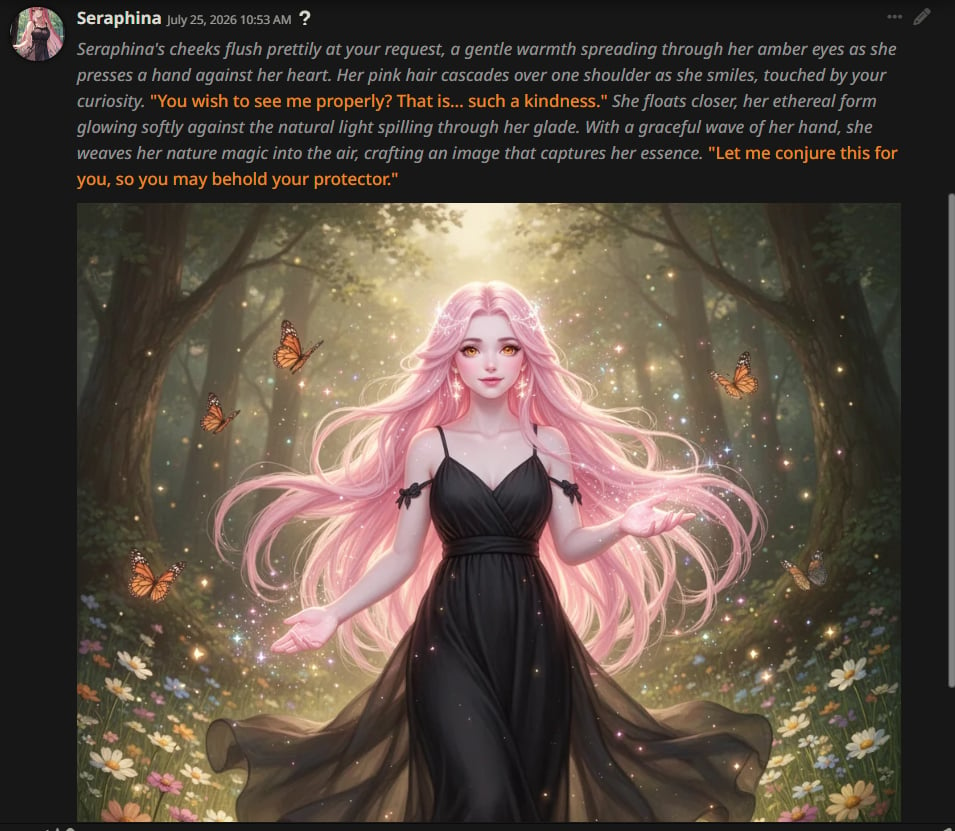
You can generate images **inside SillyTavern chat** using Routeway [Server Tools](/guides/chat-completions/server-tools). Append an image model tag to your text model ID — for example `qwen3.8-max-preview@flux-2-turbo` — then ask the character to draw or show something. The image renders inline in the message:
 ### Enable external media
By default, SillyTavern may block external images. To allow Server Tool images to display:
1. Click **User Settings** (the gear icon) on the top menu bar.
2. Find **Forbid External Media** and **disable** it.
Once disabled, generated images from Routeway appear directly in the chat stream.
***
## Tips
* **Streaming** works out of the box — enable it in SillyTavern's settings for real-time token output.
* **Context size** — check the model's max context on the [models page](https://routeway.ai/models) and set SillyTavern's context limit accordingly.
* **Free vs. paid models** — free models have rate limits. If you hit them frequently during RP sessions, consider switching to a paid model.
* **Image generation** — use a `@` tagged model and disable **Forbid External Media** so images render inline. See [Server Tools](/guides/chat-completions/server-tools).
### Enable external media
By default, SillyTavern may block external images. To allow Server Tool images to display:
1. Click **User Settings** (the gear icon) on the top menu bar.
2. Find **Forbid External Media** and **disable** it.
Once disabled, generated images from Routeway appear directly in the chat stream.
***
## Tips
* **Streaming** works out of the box — enable it in SillyTavern's settings for real-time token output.
* **Context size** — check the model's max context on the [models page](https://routeway.ai/models) and set SillyTavern's context limit accordingly.
* **Free vs. paid models** — free models have rate limits. If you hit them frequently during RP sessions, consider switching to a paid model.
* **Image generation** — use a `@` tagged model and disable **Forbid External Media** so images render inline. See [Server Tools](/guides/chat-completions/server-tools).