Service tiers are a provider feature from OpenAI and Gemini — not something Routeway implements on its own. When you set a tier, Routeway forwards it to the upstream provider and applies the matching price multiplier on your bill. Routeway does not run a separate queue or priority system; any latency or capacity differences come from how the provider handles that tier.
Available Tiers
Supported Models
Service tiers are currently supported on a subset of OpenAI and Gemini models. Availability varies by model — Routeway does not enable tiers on every model from those providers, and models from Anthropic, DeepSeek, and other providers do not support them yet.Models Catalog
Open any model page on the Models Catalog and scroll to the bottom. If the model supports service tiers, you’ll see a Service Tiers section and tier-specific rates under Token Pricing. For example, GPT 5.6 Luna shows all three tiers with their multipliers: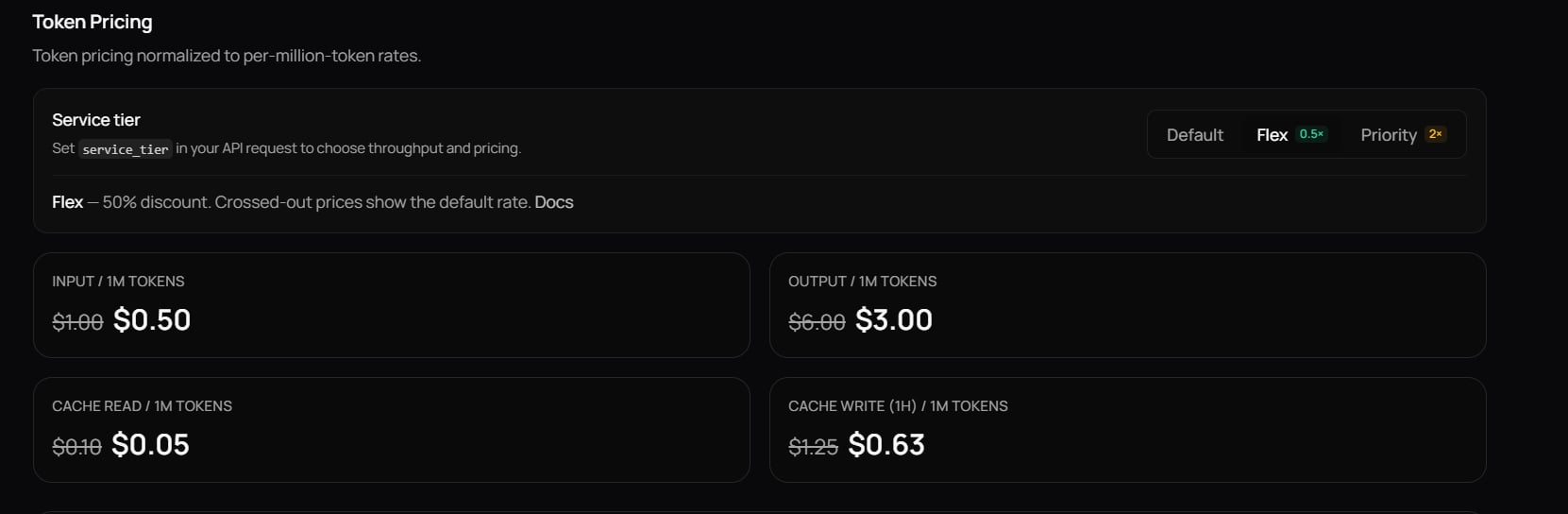
API
Query the models endpoint and look forservice_tier in supported_parameters and the tier list in capabilities.service_tiers:
Service tiers apply to the listed per-token rates in the model’s
pricing object. See How Billing Works for how multipliers affect your bill.Setting a Service Tier
There are two ways to select a tier. Both produce the same result — use whichever fits your setup.Option 1: service_tier Parameter
Pass service_tier in the request body. This is the recommended approach when you control the API payload.
- Python
- Node.js
- cURL
"default", "flex", and "priority". Omit the parameter (or set "default") to use standard pricing and performance.
Option 2: Model Suffix
Append:flex or :priority to the model ID. This is useful in chat UIs and other tools where you cannot pass extra request parameters.
Response Field
The response includes aservice_tier field indicating which tier actually processed the request:
When to Use Each Tier
Default
Your everyday choice. Standard pricing with balanced performance for most production traffic.
Flex
Save 50% with the same output quality. Ideal when you want lower costs and can tolerate the occasional slower start — TTFT may be higher, but generation speed is unchanged.
Priority
Pay a premium for lower, more predictable TTFT when users are waiting on the first token in real time.